Overview: When to use the CI SDK

This guide is for teams that do not use Fastlane or want a single, flexible way to upload mobile builds and trigger test runs from any CI system. Use the QA Wolf CI SDK if your mobile builds are produced directly in CI scripts; you want the same integration approach for mobile and web testing; you are not using GitHub Actions or prefer not to rely on prebuilt actions; or you need fine-grained control over when artifacts are uploaded, and runs are triggered. This guide assumes only that your CI system can run Node.js.
Before using the CI SDK:
  1. Make sure you have a CI pipeline that produces a mobile build artifact (APK, AAB, or IPA)
  2. Node.js 18 or later is available in your CI environment.
  3. A QA Wolf API key is stored as a CI secret (QAWOLF_API_KEY),
  4. Artifact naming conventions are defined for your environments.
Mobile triggers must be enabled for your workspace by QA Wolf before test runs will execute.
The CI SDK performs two main tasks:
1
Uploading a mobile build artifact to QA Wolf AND
2
Notifying QA Wolf of a deployment event to trigger a test run.
You can upload builds without triggering runs, which is useful during initial setup or validation.
You provide the artifact basename when uploading. QA Wolf applies the file extension automatically based on the uploaded file.
Install the SDK in your CI job:
npm install @qawolf/ci-sdk
Make sure the job has access to the QAWOLF_API_KEY environment variable.

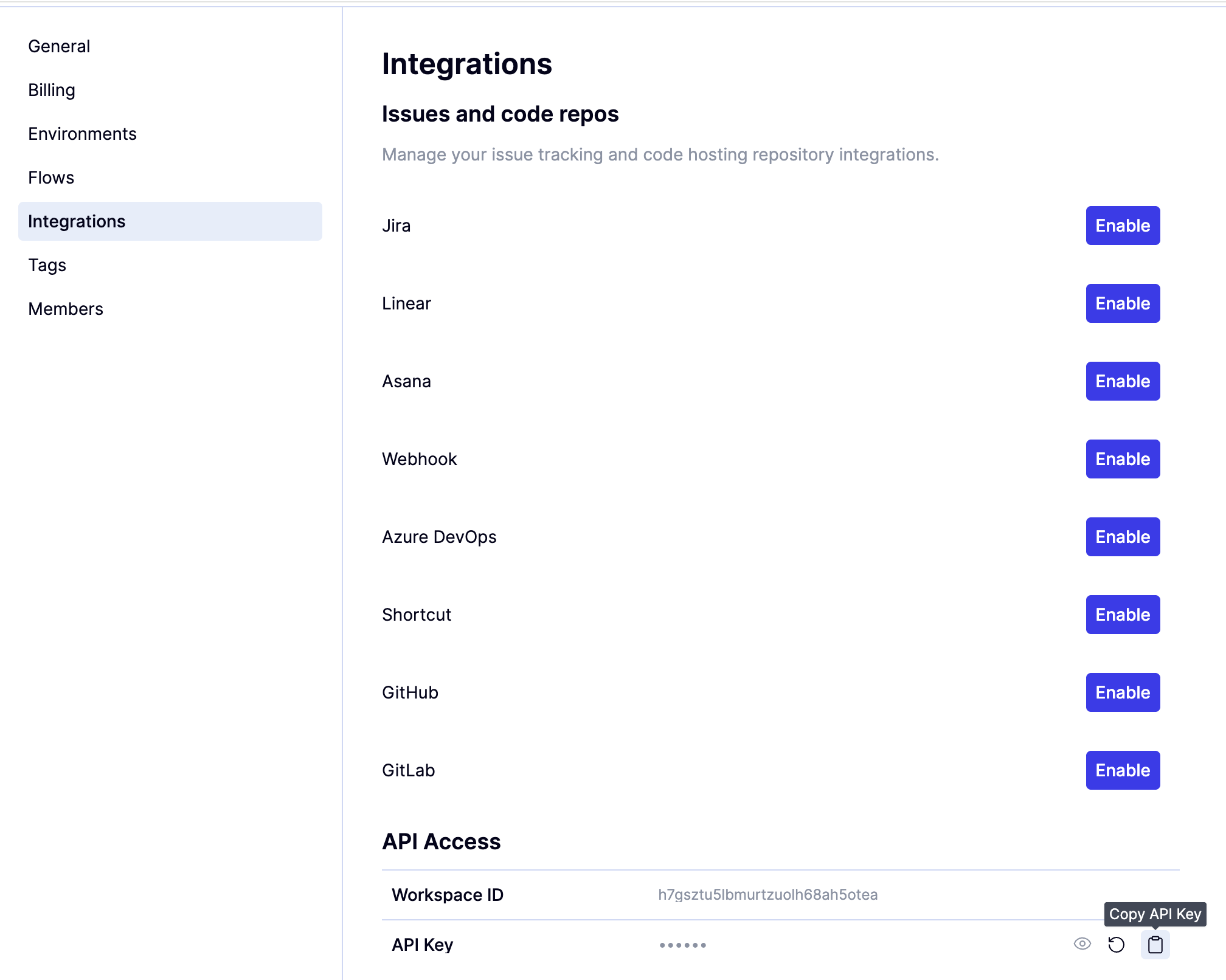
To find the QAWOLF_API_KEY:
1
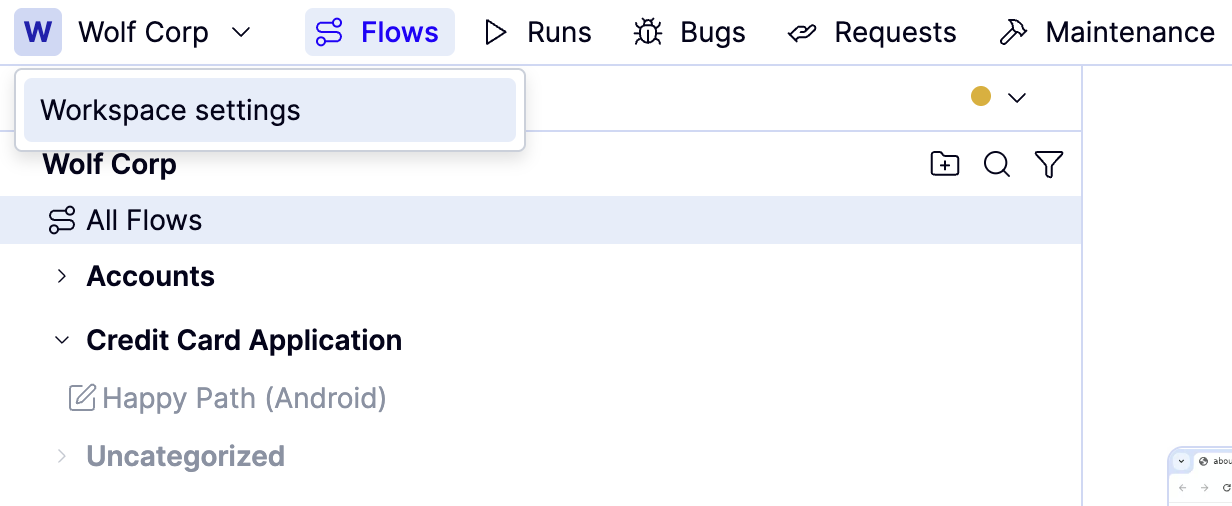
Open the Workspace name dropdown in QA Wolf and click Workspace Settings.
2
Choose Integrations,
3
Generate your QAWOLF_API_KEY by clicking the icon to the right of API Key under API Access?.
After your CI pipeline produces a mobile build artifact, upload it to QA Wolf using the SDK.
Javascript
import { makeQaWolfSdk } from "@qawolf/ci-sdk";
import fs from "fs/promises";

const sdk = makeQaWolfSdk({
  apiKey: process.env.QAWOLF_API_KEY,
});

async function uploadBuild() {
  const signedUrl = await sdk.generateSignedUrlForRunInputsExecutablesStorage({
    destinationFilePath: "app-staging",
  });

  const fileBuffer = await fs.readFile("./path/to/build.apk");

  await fetch(signedUrl.uploadUrl, {
    method: "PUT",
    body: fileBuffer,
    headers: {
      "Content-Type": "application/octet-stream",
    },
  });

  return `/home/wolf/run-inputs-executables/${signedUrl.playgroundFileLocation}`;
}

const executablePath = await uploadBuild();
If this step completes successfully, the artifact is uploaded and available for test runs.
Javascript
import { type DeployConfig, makeQaWolfSdk } from "@qawolf/ci-sdk";
import fs from "fs/promises";
import path from "path";

const { generateSignedUrlForRunInputsExecutablesStorage, attemptNotifyDeploy } =
  makeQaWolfSdk({
    apiKey: "qawolf_xxxxx",
  });

(async () => {
  const playgroundFileLocation = await uploadRunArtifact("/FileLocation");

  if (playgroundFileLocation) {
    const deployConfig: DeployConfig = {
      branch: undefined,
      commitUrl: undefined,
      deduplicationKey: undefined,
      deploymentType: undefined,
      deploymentUrl: undefined,
      ephemeralEnvironment: undefined,
      hostingService: undefined,
      sha: undefined,
      variables: {
        RUN_INPUT_PATH: playgroundFileLocation,
        // for mobile apps, the team may request that you use a different
        // variable name here, such as ANDROID_APP
      },
    };

    const result = await attemptNotifyDeploy(deployConfig);
    if (result.outcome !== "success") {
      // Fail the job.
      process.exit(1);
    }
    const runId = result.runId;
  }
})();

async function uploadRunArtifact(filePath: string): Promise<string> {
  const fileName = path.basename(filePath);

  const signedUrlResponse = await generateSignedUrlForRunInputsExecutablesStorage({
	  // for mobile apps, we prefer static filenames based on the environment name
	  // for example, use `app_staging.apk` for the Staging environment
    destinationFilePath: fileName,
  });

  if (
    signedUrlResponse?.success &&
    signedUrlResponse.playgroundFileLocation &&
    signedUrlResponse.uploadUrl
  ) {
    const fileBuffer = await fs.readFile(filePath);
    const url = signedUrlResponse.uploadUrl;

    try {
      const response = await fetch(url, {
        method: "PUT",
        body: fileBuffer,
        headers: {
          "Content-Type": "application/octet-stream",
        },
      });

      if (!response.ok) {
        return "";
      }
    } catch (error) {
      return "";
    }
    
    // for mobile apps, we request that you include this prefix path
    // return `/home/wolf/run-inputs-executables/${signedUrlResponse.playgroundFileLocation}`;
    
    // for other apps
    return signedUrlResponse.playgroundFileLocation;
  }
  return "";
}
After uploading the artifact, notify QA Wolf that a new deployment is ready for testing.
await sdk.attemptNotifyDeploy({
  deploymentType: "android_app",
  variables: {
    ANDROID_APP: executablePath,
  },
});
The deployment type and environment key must match the values configured by QA Wolf for your workspace.
If mobile triggers have not yet been enabled, this step will complete without starting a test run.
1
Run the CI job
2
Verify that the artifact upload completes successfully,
3
Confirm that the deployment notification step runs without errors.
4
Once mobile triggers are enabled, check the Runs tab for the test run that was triggered.
  • If uploads succeed but no runs start: Mobile triggers may not yet be enabled. Contact QA Wolf to complete platform configuration.
  • If the artifact is not found during execution: Verify that the artifact basename matches your naming conventions, and the returned path is used when triggering the run.
  • If you see authentication errors: Verify that QAWOLF_API_KEY is configured correctly in your CI environment.
  • If you encounter Node.js errors: Ensure Node.js 18 or later is available in the CI job.
Last modified on February 9, 2026