

Overview: What is the Elements tab?
The Elements tab is a testing-focused inspection tool designed to help create reliable tests. Unlike standard browser developer tools, it is optimized for identifying elements and creating stable locators rather than for debugging or modifying page structure. Use the Elements tab to inspect the DOM, evaluate attributes, and design locators that are well-suited for automated testing. This focus helps reduce brittle locators and improves test stability over time. The Elements tab is read-only and does not modify the page structure.How to: Choose locators for an element
Note:You must have an active browser session to use the Elements tab.
Click an element in the browser to inspect. T e elements tab will populate with the platform’s recommended locator for that element.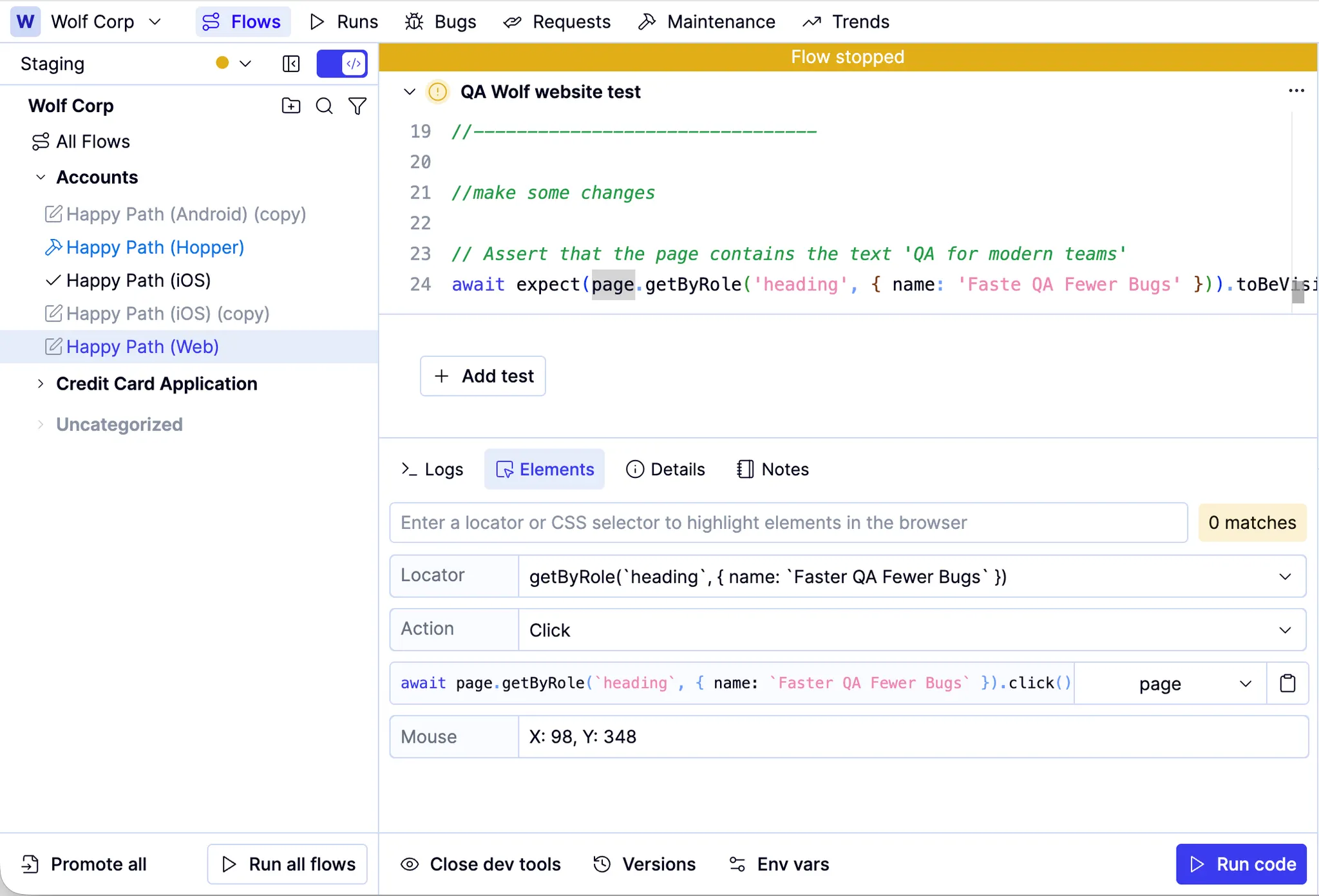
Pick an alternate locator from the Locator dropdown (the platform’s recommended locator floats to the top).
Use the Action dropdown to select a valid element interaction (defaults to click) or assertion. The locator populates in the field below the Action dropdown.