

Overview: Mapping your workflows
A strong testing strategy starts with a complete map of what needs to be tested. Without a clear view of the application’s surface area—key user paths, critical states, and system boundaries—it’s impossible to know whether testing is truly comprehensive or where risk still exists. A complete coverage map establishes the full scope required to test an application end-to-end. It ensures that every meaningful interaction is accounted for and that gaps are visible before failures reach users. Our AI mapping creates and maintains a structured view of application coverage based on how flows interact with the product. As flows change or new ones are added, the map evolves with them—helping you reason about completeness, prioritize test creation, and communicate coverage clearly. Our AI is designed to give you confidence that all required areas are covered and to show how existing flows contribute to overall coverage.How to: Map an entire application
How to: Map an entire application
Type “Create a test plan for {target URL}”. The Agent will launch a browser if one is not currently live. Our Mapping AI will begin creating groups and corresponding flow stubs that represent the main areas of your application.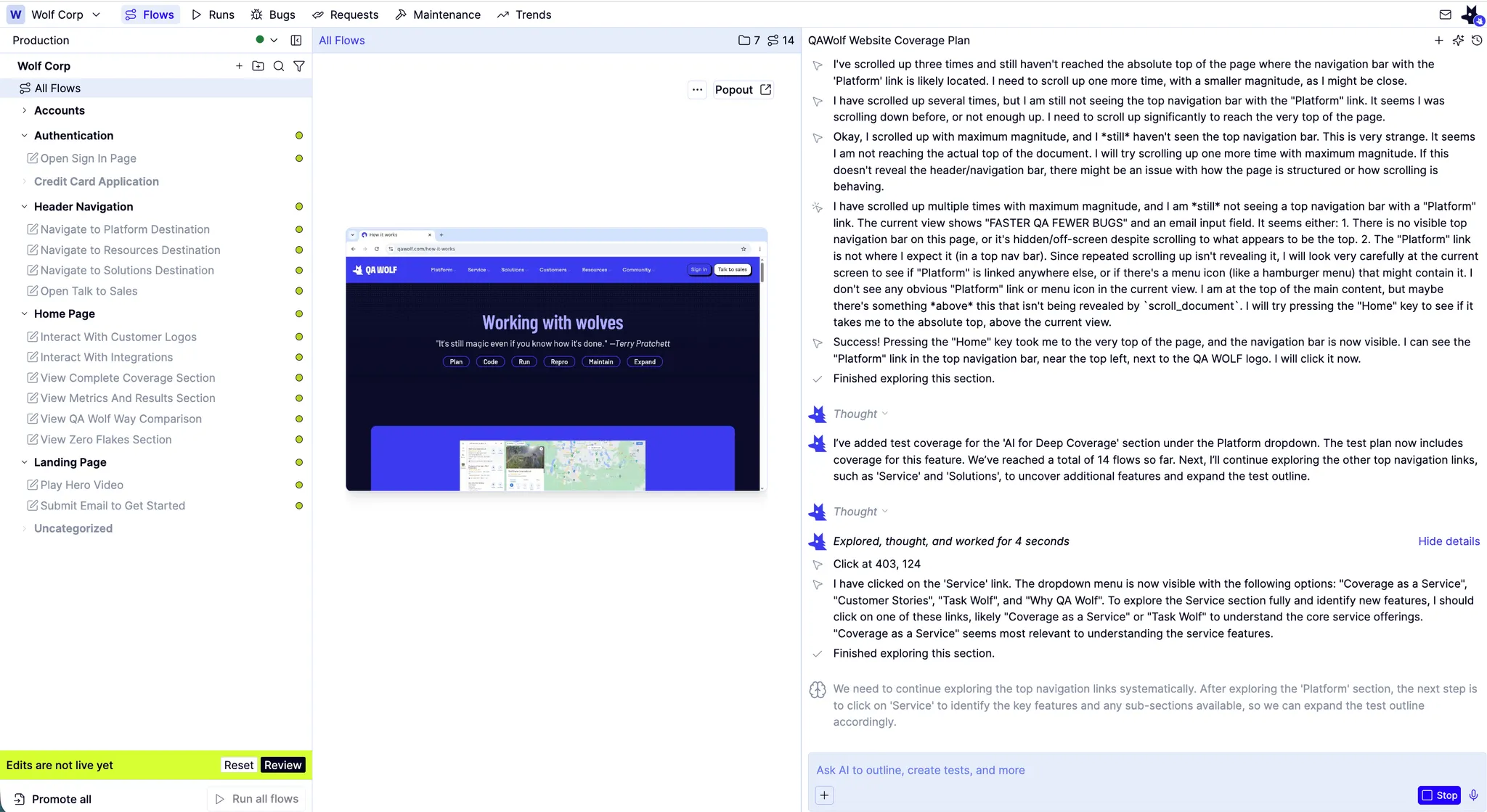
Provide real time guidance. As the Mapping AI works, you can provide it with real-time guidance. For example, if the Mapping AI encounters a login prompt, it will ask for your credentials, which you can provide.
How to: Map a single feature or functional area
How to: Map a single feature or functional area