

Onboarding
Integrations
Integrating QA Wolf into your CI/CD
Issue Tracker Integrations
Test Management Systems
VPN Connection Options
Static IP Addresses
How-to guides
Minimizing test maintenance
Requesting new test coverage
Preparing an environment for QA Wolf test runs
Minimizing test flakes
How to use Workflow Run Rules
Frequently asked questions
In what order does QA Wolf build our automated tests?
In what order does QA Wolf build our automated tests?
Unless there are certain high-priority tests need to be done first, we typically start with the most complex test cases because they take longer to build and may require more communication with your team.It’s important to mention that test creation is not linear. Because we focus on the most complex tests first, construction of your test suite will look something like this: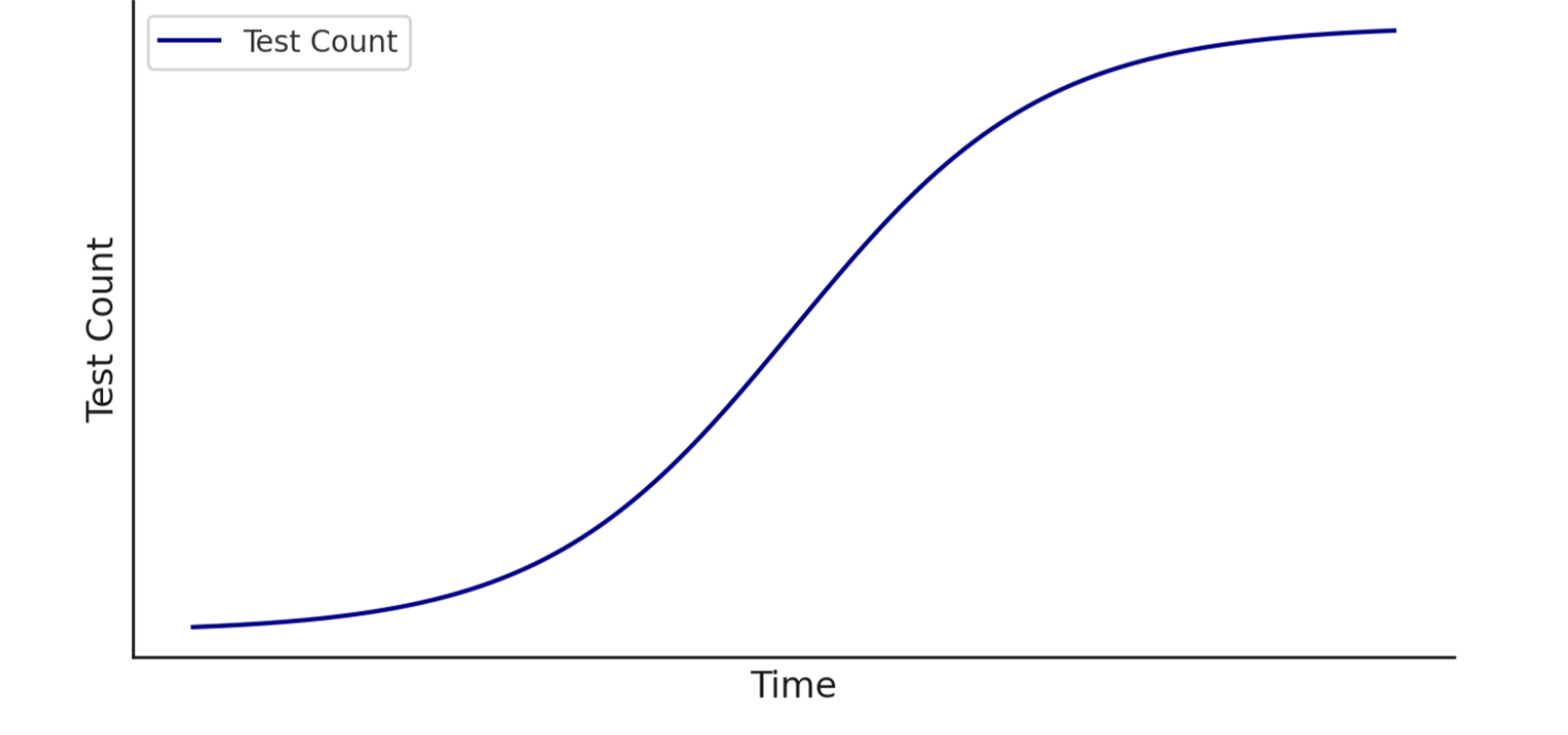
Which environment should we run our tests on?
Which environment should we run our tests on?
We recommend starting with the most stable environment before Production and expanding coverage to lower environments later if needed, but there are pros and cons to every approach.Staging (aka QA or Test) environmentsStaging environments typically strikes the right balance between Development and Production environments. Applications pushed to Staging are usually more stable, have more resources, and have consistent data.
Production environmentsProduction environments are the most stable, which means the test suite will finish faster — but any bugs that are caught testing in Production have already escaped.
Development environmentsDevelopment environments are the most commonly found type of environment, so teams are often tempted to use this environment because of its availability. However, these environments are frequently chaotic and uncontrolled.
See also: 🎯Preparing an environment for QA Wolf test runs
| Pros | Cons |
|---|---|
| Generally, it is a stable environment with additional infrastructure to support things like E2E testing, internal QA efforts, and, in some cases, load testing. | Depending on your release schedule, Staging may not be updated as often as the Development branch, so regressions are caught later in the SDLC. |
| Ability to facilitate E2E testing (e.g., allowlist specific email domains) that you may not want to include in other environments. | |
| Data is generally more predictable and less likely to become corrupted. |
| Pros | Cons |
|---|---|
| Production is the actual end-user experience, so E2E flows will test exactly what the user is getting. | Too late to prevent end users from being impacted by bugs. |
| Production infrastructure is meant for scale, so parallelization is less likely to be an issue and may highlight load-testing opportunities. | There may be financial consequences of testing in production (for example, checkout flows must use real money). |
| Pros | Cons |
|---|---|
| Testing quickly after merging a feature branch gives developers quick feedback on possible regressions, enabling quicker fixes. | Dev environments are often less stable, which may slow down test creation. |
| Tests flag bugs that you may not be concerned about yet. |
When will our tests start running?
When will our tests start running?
Tests start running as soon as they’re built, and our goal is to provide as much value as quickly as possible, starting with your business-critical workflows. To expedite the process, make sure that your team is available for the Product Tour meeting, and that you approve the coverage outline as soon as it’s ready.
Who will we be working with from QA Wolf?
Who will we be working with from QA Wolf?
Every customer gets a dedicated team of Wolves to make sure that they’re successful:Account ExecutiveYour AE will take you through contracting, security reviews, and any other internal procedures your company needs to go through.Customer Success ManagerStrategic owner on QA Wolf’s side for our partnership, helping ensure we are aligned on your goals and helping you get the most out of our service.QA LeadPrimary point of contact for technical implementation, including your test plan and implementation and testing of new features.QA TeamResponsible for implementing tests, investigating failures, maintaining tests, and reporting bugs.
How often does a QA Wolf test suite run?
How often does a QA Wolf test suite run?
Unlimited test runs are included in the service cost — you can run them as often as you like. By default, your suite will run once a day, which is where most companies start. As their deployment processes mature they increase the frequency of testing.You can ask your QA Lead about increasing or decreasing your test runs to best fit your process.
What happens when a test fails?
What happens when a test fails?
When tests fail, a QA Wolf engineer investigates what happened and determines if there’s a bug in the application, or simply a problem with the test.If there’s a bug in the application, we will file a bug report through your messaging system (e.g., Slack, Teams) and issue tracker (e.g., Jira, Linear).If there’s a problem with the test, it can usually be resolved on the fly. However, there will be tests that need to be disabled for more substantial maintenance work.You can monitor the status of failed tests in the QA Wolf application.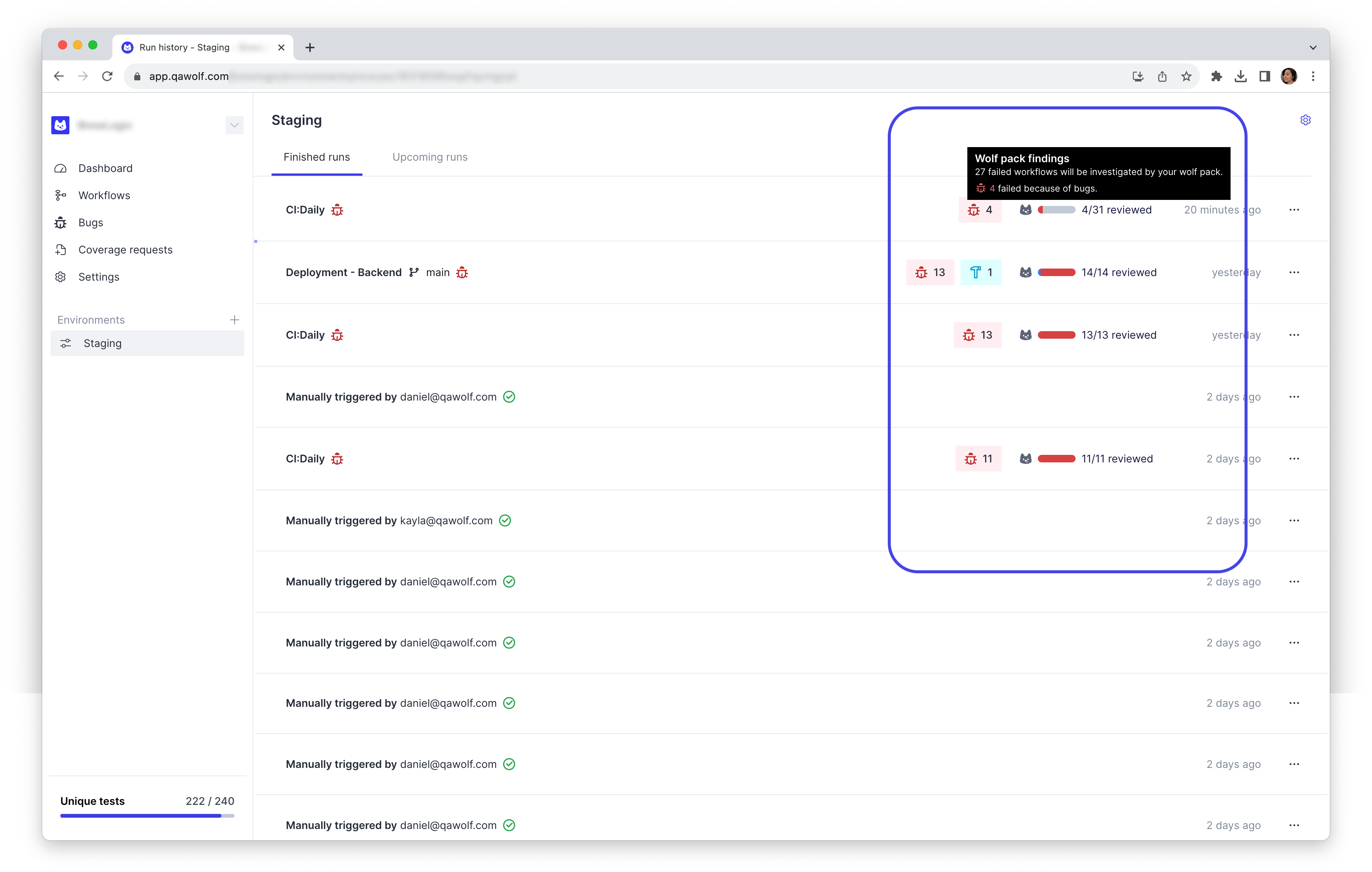
What’s included in a bug report?
What’s included in a bug report?
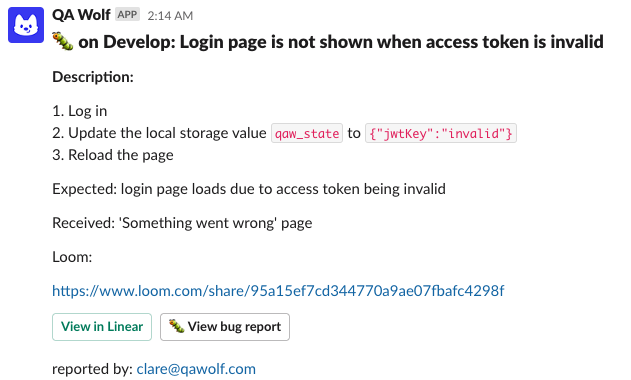
- Expected behavior and actual behavior.
- Steps to reproduce.
- Loom video walk-through of the bug and relevant additional information.
- A link to the failing test run, which has a video replay of the headful browser run and includes Playwright trace logs.
How does QA Wolf handle flaky tests?
How does QA Wolf handle flaky tests?
As a customer, you’ll never have to deal with flaky tests, which are tests that fail one or more times before eventually passing. Since flaky tests create noise that would otherwise slow down your release velocity, our dedicated QA team will take care of everything and make sure that you only see real, human-verified bugs. That’s our Zero Flake Guarantee.To keep things moving as quickly as possible, any test that fails is automatically re-run. That’s because anything from a simple network hiccup to a slow email server could cause a flake. After multiple failures in a row, a human steps in to investigate the root cause.See also: 🧩 Minimizing test flakes
Can I integrate QA Wolf into our CI/CD pipeline?
Can I integrate QA Wolf into our CI/CD pipeline?
Yes. QA Wolf can be integrated with any CI/CD system, and support any deployment pipeline. Talk to your QA Lead or Customer Success Manager for help getting set up.See also: Integrating QA Wolf into your CI/CD
How do you test features that send or receive emails?
How do you test features that send or receive emails?