

Post to /api/webhooks/deploy_success Webhook
HTTP Method: POST
Sample Query
Shell
This command is for illustration purposes. We don’t recommend “curling” without inspecting the result as not all 200 responses imply a successful run trigger. We recommend using the SDK for that purpose as it does the interpretation work for you!
API key
API key
Go to 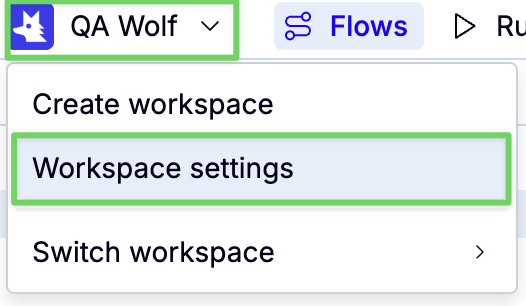
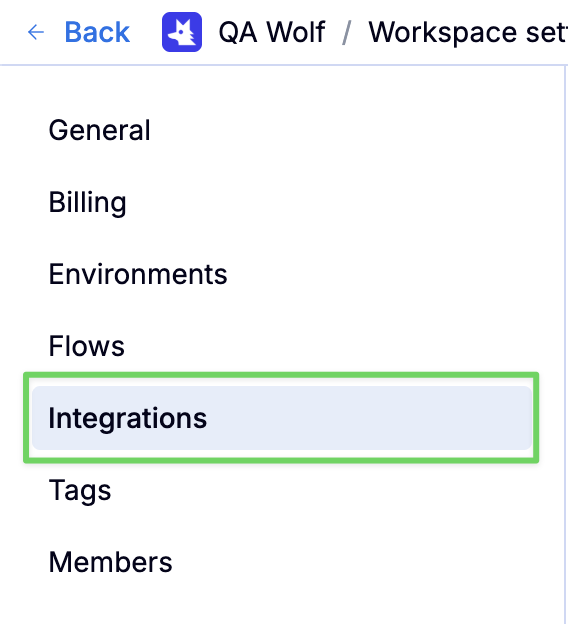

https://app.qawolf.com/<team slug>/settings/integrationsOr, navigate via the UI:Required Request Headers
| Header Name | Header Value | Description |
|---|---|---|
Authorization | Bearer api_*** | Provide a string constructed by appending your team API Key to Bearer. |
Content-Type | application/json |
JSON-formatted Request Body
ThisPOST request supports a JSON-formatted object with the below fields. All fields are optional.
Commonly Used Fields
| Field | Value | Description | |
|---|---|---|---|
branch | Git branch name | If a Git commit triggered this request, send us the relevant branch name so that we can display it in the UI and find any pull requests on the GitHub repo linked to any triggers that match. | |
deployment_type | Arbitrary string setup in triggers. | This field must be provided if the target trigger requires matching a deployment type. | |
deployment_url | URL | If you send this, it will be available in your tests as process.env.URL for any runs created by this deployment notification. | |
sha | Commit sha | If a Git commit triggered this request, send us the commit SHA so that we can create GitHub commit checks if you have a GitHub repo linked to any triggers that match. We also use this to display a link to the commit in the run UI. |
Advanced Fields
| Field | Value | Description |
|---|---|---|
variables | Dictionary of key/values | A dictionary of environment variable names/values that will override any variables from the associated environment in every run that your notification triggers. |
commit_url | URL | If your deployment triggers do not specify a hosting service repo, pass this URL along with sha to ensure that the commit ID will be a clickable link everywhere in the QA Wolf UI and notifications. |
deduplication_key | Arbitrary string | By default, any new run will cancel ongoing runs which have the same branch (see field above) / environment (determined by the trigger) combination. If only environment is available, cancelation will occur for runs in the same environment. You can customize this behavior by providing a custom key. All new runs that start as a result of this notification will auto-cancel all previous runs with the same key that are not yet finished. |
hosting_service | GitHub | GitLab | By default, we use GitHub, but pass GitLab for GitLab integration support. |
ephemeral_environment | Boolean | If your deployment is not associated with a code-hosting integration. Pass this field along with deployment_url |
Passing 
commit_url will display a link to the commit at the top right of the run page, and anywhere else the commit ID appears.Choosing Fields Based on Your Setup
Use
deployment_url to point to the appropriate deployment (especially if it is dynamic for the setup environment associated with the trigger).deployment_type may be required if it was configured in your triggerWith GitHub/GitLab app installed
See Install GitHub/GitLab App for more guidance.
sha, branch, hosting_service.
Using custom CI pipeline (or not using GitHub/GitLab App)
Providecommit_url, branch, ephemeral_environment.
Response
200 Responses
The response will look like this:results is an array of all the matched triggers including either created_suite_id if suite (aka run) was created, or failure_reason if it could not be created, or duplicate_suite_id if suite (aka run) was previously created and a skip_reason explaining why.
In case the request was made with a previously used sha, and a suite was already created for that deployment, the response will look like:
TypeScript
duplicate_suite_id in place of a created_suite_id signifying that a new suite wasn’t kicked off, and one for this deployment already exists.
The endpoint can return 200 while no run was ever created. You should inspect the response to determine the success status, or use our SDK
attemptNotifySuccess function which will do that for you.HTTP Status Error Codes
| Code | Description |
|---|---|
| 401 | Missing or invalid credentials. Make sure you are using the Authorization: Bearer XXX with XXX the API token for your team. |
| 403 | Forbidden. Usually indicates a disabled team. Contact support. |
| 404 | Run not found. |
| 405 | Method not allowed. Make sure you use POST. |
| 500 | Internal server error. If the issue persists, contact support. |
Failure Codes
multiple-runs-with-same-deduplication-key
This error happens when there is adeduplication_key set in the request and there are multiple matching triggers (multiple runs would start) making them cancel each other based on our superseding mechanism. If you meant to initiate multiple runs for this deployment, do not provide a deduplication_key. If you did NOT intend to initiate multiple runs, please contact your QA Wolf representative, this might be a configuration issue.