> ## Documentation Index
> Fetch the complete documentation index at: https://docs.qawolf.com/llms.txt
> Use this file to discover all available pages before exploring further.
# Assert visual appearance
> Use toHaveScreenshot to catch layout regressions and verify UI elements that can't be targeted with selectors.
This page covers web only, including mobile web using Playwright emulators.
To perform a visual comparison, use `toHaveScreenshot`.
```js theme={null}
toHaveScreenshot(name, options)
```
* `name` — string used to identify and store the baseline image
* `options` — optional object controlling comparison behavior, see Key options below
## Examples
**Assert a canvas element:**
```js theme={null}
await expect(
page.locator(`[class*="chart-canvas"]`)
).toHaveScreenshot(
`revenue-chart`,
{
maxDiffPixelRatio: 0.01,
timeout: 60 * 1000,
}
);
```
**Assert a specific UI component:**
```js theme={null}
await expect(
page.locator(`[class*="nav-header"]`)
).toHaveScreenshot(
`nav-header`,
{
maxDiffPixelRatio: 0.01,
timeout: 60 * 1000,
}
);
```
**Assert a full page:**
```js theme={null}
await expect(page).toHaveScreenshot(
`checkout-page`,
{
fullPage: true,
maxDiffPixelRatio: 0.01,
timeout: 60 * 1000,
}
);
```
Omitting a name and `maxDiffPixelRatio` makes the baseline hard to identify and causes minor rendering differences to fail the test.
```js theme={null}
// Avoid
await expect(page.locator(`[class*="chart-canvas"]`)).toHaveScreenshot();
```
## When to use
* Your test needs to assert the content or appearance of a `canvas` element — canvas is not part of the DOM and cannot be targeted with locators.
* You want to catch layout or style regressions after a redesign or component change.
* No selector or functional assertion can verify the visual state you need.
* Your app has pixel-perfect design requirements, and you want automated enforcement.
Avoid `toHaveScreenshot` when the area contains timestamps, live data, animations, or other frequently-changing content — these cause false failures. Use a functional assertion instead.
## Key options
| Option | Description | Recommended |
| ------------------- | ------------------------------------------ | ----------- |
| `maxDiffPixelRatio` | Fraction of pixels allowed to differ (0–1) | `0.01` |
| `maxDiffPixels` | Absolute pixel count allowed to differ | Situational |
| `fullPage` | Capture the full scrollable page | `false` |
| `timeout` | Max milliseconds to wait for a match | `60000` |
## Notes
* On the first run, no baseline exists yet — the screenshot is saved automatically as the expected image. See the instructions below to review it before relying on the test.
* To inspect a visual diff result in the editor, collapse the test block — an icon will appear in the right gutter of that line. Click it to open the Image Diff panel, where you can view the **Diff**, **Expected**, **Actual**, and **Compare** tabs for each named snapshot.
* On subsequent runs, a new screenshot is compared pixel-by-pixel to the baseline. If the difference exceeds the threshold, the test fails, and a diff image is saved showing exactly which pixels changed.
* If a UI change is intentional, promote the new screenshot as the updated baseline in the QA Wolf editor. Future runs will compare against the new image.
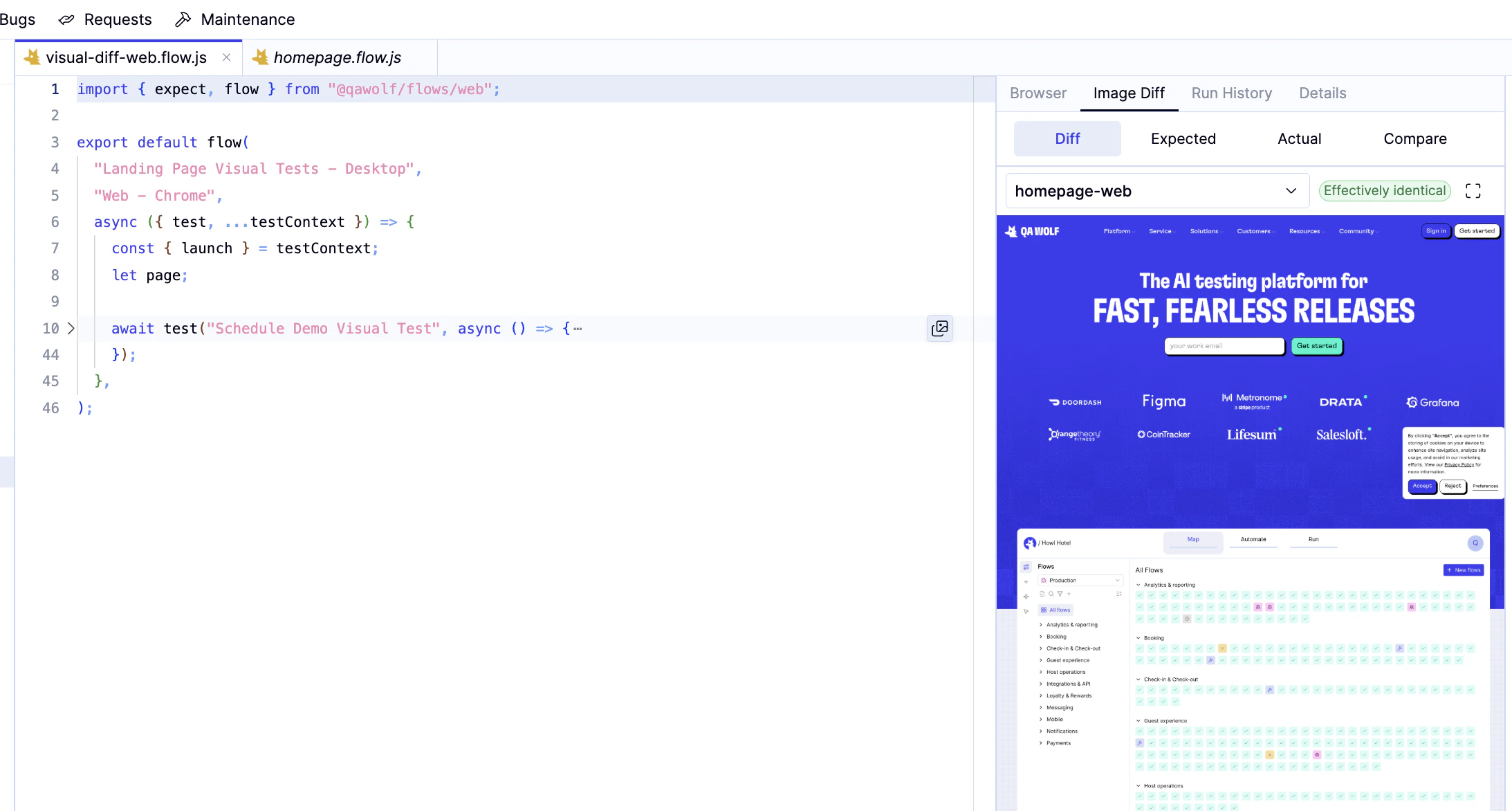 ## Full sample test
```js theme={null}
import { expect, flow } from "@qawolf/flows/web";
export default flow(
"Landing Page Visual Tests - Desktop",
{ target: "Web - Chrome", launch: true },
async ({ page, test }) => {
await test("Schedule Demo Visual Test", async () => {
//--------------------------------
// Arrange:
//--------------------------------
//! Opening the home page of QA Wolf
//!! navigate to the "https://www.qawolf.com/"
await page.goto("https://www.qawolf.com/");
//!! wait for loadstate to be "domcontentloaded"
await page.waitForLoadState("domcontentloaded");
//--------------------------------
// Assert:
//--------------------------------
//! Check that certain elements on the home page match the expected screenshots
//!! expect the screen to match "homepage-web"
await expect(page).toHaveScreenshot(
`homepage-web`,
{
fullPage: true,
maxDiffPixelRatio: 0.01,
timeout: 60 * 1000,
}
);
});
},
);
```
## Full sample test
```js theme={null}
import { expect, flow } from "@qawolf/flows/web";
export default flow(
"Landing Page Visual Tests - Desktop",
{ target: "Web - Chrome", launch: true },
async ({ page, test }) => {
await test("Schedule Demo Visual Test", async () => {
//--------------------------------
// Arrange:
//--------------------------------
//! Opening the home page of QA Wolf
//!! navigate to the "https://www.qawolf.com/"
await page.goto("https://www.qawolf.com/");
//!! wait for loadstate to be "domcontentloaded"
await page.waitForLoadState("domcontentloaded");
//--------------------------------
// Assert:
//--------------------------------
//! Check that certain elements on the home page match the expected screenshots
//!! expect the screen to match "homepage-web"
await expect(page).toHaveScreenshot(
`homepage-web`,
{
fullPage: true,
maxDiffPixelRatio: 0.01,
timeout: 60 * 1000,
}
);
});
},
);
```