> ## Documentation Index
> Fetch the complete documentation index at: https://docs.qawolf.com/llms.txt
> Use this file to discover all available pages before exploring further.

# Onboarding to Full Service

> What to expect during QA Wolf full service onboarding, including timelines, meetings, and setup steps.

QA Wolf's full service means we don't just provide the platform — we also create, maintain, and run your end-to-end tests for you.

Our team writes Playwright and Appium tests and expands coverage over time. We fix broken tests as your product changes, and keep them running reliably on every pull request, schedule, or trigger you choose.

You still own the code and can modify it at any time. We simply handle the ongoing work required to keep end-to-end coverage healthy.

With full service, QA Wolf:

* Writes and expands your end-to-end tests
* Maintains tests as your app evolves
* Runs tests in parallel across our infrastructure
* Investigates failures and fixes test issues
* Provides clear artifacts like videos, logs, and traces for every run

The goal is simple: you get high end-to-end coverage without needing to build and operate a large internal test automation team.

## Needed to get started

**Integrations**

* [ ] Connect a messaging app (Slack, MS Teams, Discord).
* [ ] Provide test environment credentials.

**Resources**

* [ ] Share any existing test plans or internal priority lists.
* [ ] Share any existing E2E tests you may be running.

**Actions**

* [ ] [Prepare environments for QA Wolf](/prepare-environments-for-qa-wolf)
* [ ] Assign a champion point of contact to remove blockers

## Onboarding timeline

These are rough timelines from the contract start date.

<Steps>
  <Step title="**Kick-off** (by day 5)">
    **Agenda**<br />Meet your dedicated team, review coverage goals, and align on milestones and timelines.

    **Goals**

    * Connect a shared Slack, Teams, or Discord channel.
    * Get access to a testing environment.
    * Learn about coverage goals and priorities.

    **Attending**

    <table style={{ display: "table", tableLayout: "fixed", width: "100%" }}>
      <thead>
        <tr><th>Your team</th><th>Our team</th></tr>
      </thead>

      <tbody>
        <tr><td>Point of contact during the sales process</td><td>Customer Success Manager</td></tr>
        <tr><td>Day-to-day champion</td><td>QA Lead</td></tr>
        <tr><td>Engineers, PMs, and members of your QA team you want involved</td><td> </td></tr>
      </tbody>
    </table>
  </Step>

  <Step title="**Product tour** (by day 5)">
    **Agenda**<br />You'll walk our team through your app and point out critical priorities or anything to avoid.

    **Goals**

    * Learn how your product works and how features are related.
    * Discuss any "gotchas" that affect how tests need to run.
    * Prioritize tests to build first.

    **Attending**

    <table style={{ display: "table", tableLayout: "fixed", width: "100%" }}>
      <thead>
        <tr><th>Your team</th><th>Our team</th></tr>
      </thead>

      <tbody>
        <tr><td>PM or engineering lead familiar with what needs testing</td><td>QA Lead</td></tr>
        <tr><td> </td><td>Test outliner</td></tr>
      </tbody>
    </table>
  </Step>

  <Step title="**First test plan review** (by day 15)">
    **Agenda**<br />The initial test plan is a high-level view of what flows we recommend testing. After you approve we'll outline specific test steps and assertions.

    **Goals**

    * Review the high-level flows.
    * Add, revise, or replace any flows you think are necessary.
    * Re-confirm priorities and get approval to begin outlining.

    **Attending**

    <table style={{ display: "table", tableLayout: "fixed", width: "100%" }}>
      <thead>
        <tr><th>Your team</th><th>Our team</th></tr>
      </thead>

      <tbody>
        <tr><td>PM or engineering lead</td><td>QA Lead</td></tr>
        <tr><td> </td><td>Test outliner</td></tr>
      </tbody>
    </table>

    <Warning>
      Potential blockers: Stakeholders aren't aligned on what coverage is necessary, or they're not available to review and approve the test plan.
    </Warning>
  </Step>

  <Step title="**Final test plan review** (by day 20)">
    **Agenda**<br />The final test plan outlines the specific test steps and assertions in the [Arrange-Act-Assert (AAA)](/Glossary#arrange-act-assert-aaa) format.

    **Goals**

    * Review AAA outlines and make any necessary adjustments.
    * Get approval to begin automating your tests.

    **Attending**

    <table style={{ display: "table", tableLayout: "fixed", width: "100%" }}>
      <thead>
        <tr><th>Your team</th><th>Our team</th></tr>
      </thead>

      <tbody>
        <tr><td>PM or engineering lead</td><td>QA Lead</td></tr>
        <tr><td> </td><td>Test outliner</td></tr>
      </tbody>
    </table>
  </Step>

  <Step title="**Test automation**">
    We find this order works best for most teams:

    1. Your highest priority flows.
    2. Most complex flows that take longest to build and stabilize.
    3. Simplest flows.

    <Warning>
      Potential blocker: Your test environment is too unstable to run end-to-end tests reliably. Read: [Prepare environments for QA Wolf](/prepare-environments-for-qa-wolf).
    </Warning>
  </Step>
</Steps>

## FAQ

### Who will we be working with from QA Wolf?

Every customer gets a dedicated team of Wolves to make sure that they're successful:

* **Customer Success Manager** — Strategic owner of the partnership, keeping us aligned on your goals.
* **QA Lead** — Primary point of contact for technical implementation, including your test plan and testing of new features.
* **QA Team** — Implements tests, investigates failures, maintains tests, and reports bugs.
* **Account Executive** — Guides you through contracting, security reviews, and any other internal procedures your company requires.

### In what order does QA Wolf build tests?

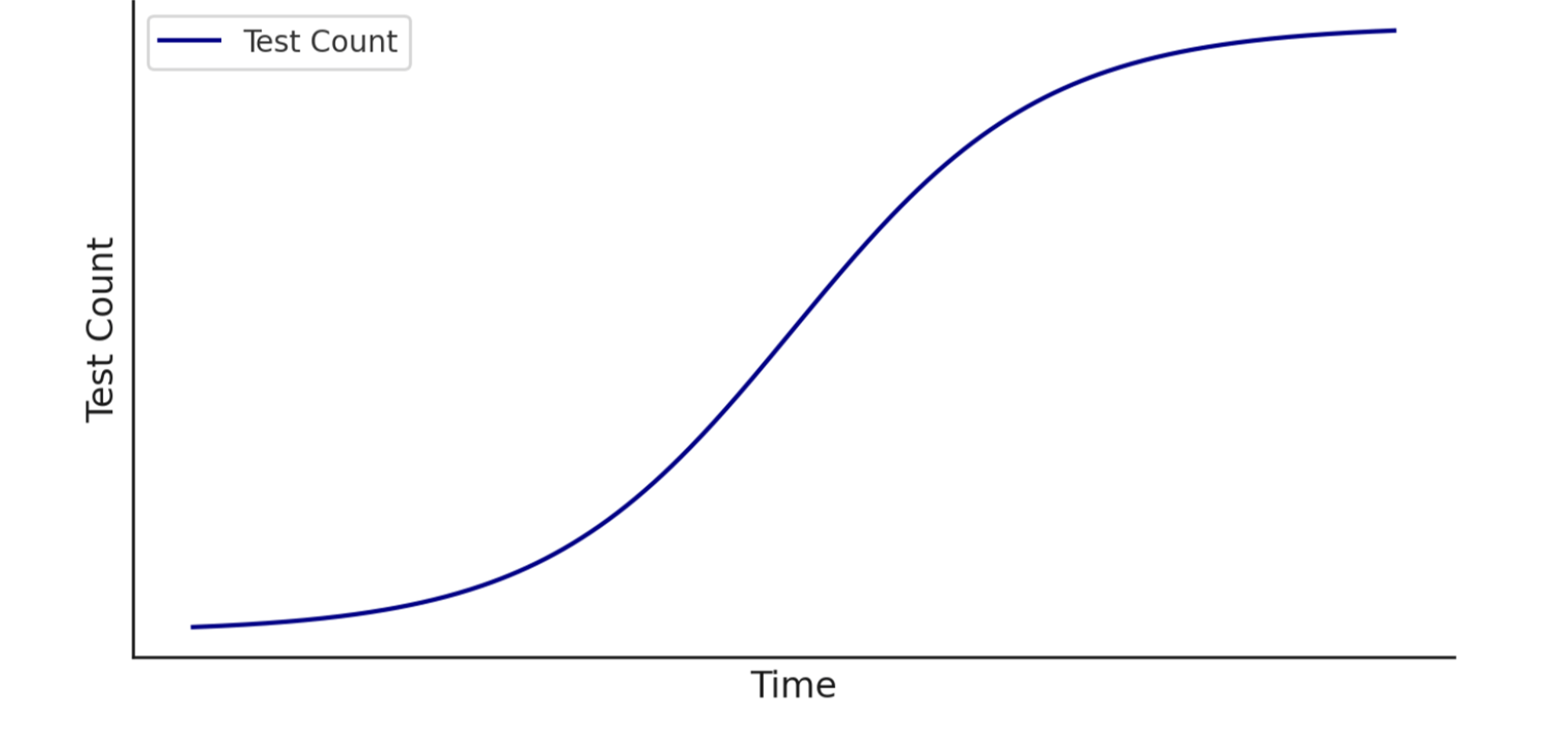
Unless there are specific high-priority tests that need to be done first, we generally start with the most complex flows. These take longer to build and often require more collaboration with your team, so tackling them early helps speed up the rest of the process.

Test creation isn't linear — we don't build one test after another in sequence. Because we focus on the hardest flows first, your suite will come together unevenly at first and then accelerate as simpler tests are added.

<Frame>
  <img src="https://mintcdn.com/qawolf/9--DhCvBwUtVg43b/images/coverage-as-a-service/image-1.png?fit=max&auto=format&n=9--DhCvBwUtVg43b&q=85&s=b077a8a68a4d8839142d93f89a47c923" alt="Test count over time as an S-curve: slow at first, then accelerating, then levelling off" width="2000" height="937" data-path="images/coverage-as-a-service/image-1.png" />
</Frame>

<Tip>
  If you have critical flows you'd like prioritized earlier, let your QA Lead know. They can adjust the build plan to align with your release schedule.
</Tip>

### When will our tests start running?

Tests start running as soon as they're built, beginning with your most business-critical flows.

To keep things moving:

* Make sure your team is available for the **Product tour** meeting.
* Approve the **coverage outline** as soon as it's ready.

<Tip>
  Engage with us early, so we prioritize the right flows and start catching issues within the first few days of onboarding.
</Tip>

### What happens when a test fails?

When tests fail, a QA Wolf engineer investigates the issue and determines whether it is a bug in the application or the test.

If there's a bug in the application, we will file a bug report through your messaging system (e.g., Slack, Teams) and issue tracker (e.g., Jira, Linear).

If there's a problem with the test, it can usually be resolved on the fly. However, some tests will need to be quarantined for more substantial maintenance work.

You can monitor the status of failed tests in the Runs tab.

### How can we prevent planned application changes from blocking a release?

One of the most common release blockers is a flow that requires maintenance before it can proceed. Most maintenance is simple and happens immediately, but sometimes a flow requires a more comprehensive update. When that happens, QA Wolf disables the affected flows and places them in **maintenance mode** until they can be fixed.

If you're planning changes that will affect more than a few pages or significantly alter the DOM, let your QA Lead know ahead of time. They can usually update or refactor the flows in advance so runs stay smooth.

<Tip>
  When in doubt, just shoot us a quick message — even a heads-up helps prevent coverage gaps or blocked runs.
</Tip>

### How does QA Wolf handle flaky tests?

As a customer, you'll never have to deal with flaky tests, which are tests that fail one or more times before eventually passing. Flaky tests create noise that slows your release velocity. Our dedicated QA team handles them, so you see only real, human-verified bugs. That's our Zero Flake Guarantee.

QA Wolf automatically re-runs any test that fails. After multiple consecutive failures, a human investigates the root cause.

### How often will our test suite run?

By default, your suite will run once a day, which is where most companies start. As their deployment processes mature, they increase testing frequency.

We also support PR testing for [GitHub](/legacy-triggers/PR-testing-for-GitHub-Integrations) and [GitLab](/legacy-triggers/PR-testing-for-GitLab-Integrations) through our Scheduled Runs. You can ask your QA Lead to increase or decrease your test runs to best fit your process.

Unlimited test runs are included in your contract, so we encourage running your suite as frequently as it makes sense for your team and process.